Choosing among the best laser engraving machines for small business requires more than comparing wattage and price. A reliable machine must fit your products, workspace, materials, and daily production demands. A compact diode laser may suit wooden signs, coated tumblers, and customized gifts. A CO2 machine can handle acrylic, leather, and thicker wood more efficiently. Fiber systems are better suited to permanent marks on metals. The differences become obvious when deadlines arrive.
Laser-industry educator Russ Sadler expresses the central lesson clearly: “A laser is a tool, not a shortcut.” That principle matters for every new business owner. Good results depend on ventilation, accurate focusing, material testing, safe operating habits, and consistent software settings. A powerful machine cannot fix poor preparation. It may only create expensive mistakes faster.
This guide examines seven practical options for small businesses. Each machine is considered through real purchasing concerns, including engraving speed, work-area size, software usability, maintenance, customer support, and long-term operating cost. We also consider the small details that affect a working day: a rotary attachment for cylindrical products, clean exhaust near a cutting table, and test grids before a full order begins.
Some recommendations may feel obvious. They are not always obvious in practice. A cheaper machine can become costly when alignment drifts or support is limited. A larger model can waste valuable space. No machine is perfect. The best choice depends on your materials, order volume, budget, and willingness to learn. Our comparisons aim to make that decision clearer, while acknowledging that hands-on testing remains essential.
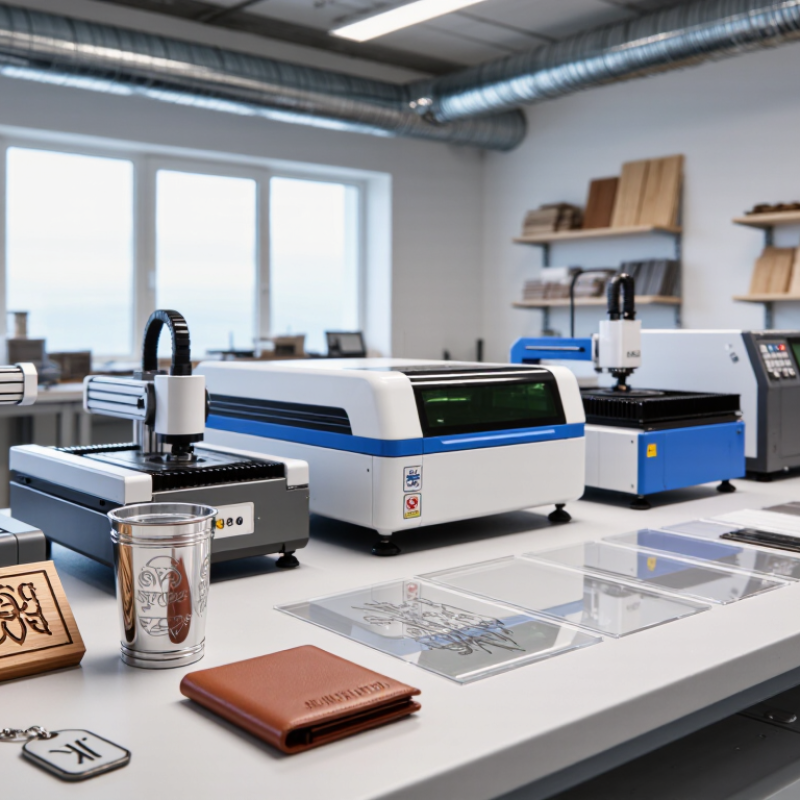
Choosing among the seven best laser engraving machines starts with materials, not advertised wattage.
Diode systems suit wood, leather, and coated surfaces. CO2 machines handle acrylic, glass, and many nonmetal materials. Fiber systems mark bare metals quickly. A larger bed helps with signs, but it also consumes more floor space.
Market demand is rising.
Grand View Research projects the laser marking machine market to grow at a 7.7% CAGR from 2024 to 2030.
MarketsandMarkets estimates growth from about $3.0 billion in 2023 to $4.7 billion by 2028.
These figures suggest opportunity, not guaranteed profit. Your local customer mix matters more.
Measure the work area twice.
A 400-by-400-millimeter bed may fit common products, but not large panels. Check rated optical power, cooling, exhaust capacity, software compatibility, and replacement-part costs.
Enclosed designs with interlocks reduce workshop risks, while suitable filtration protects indoor air. Follow applicable laser-safety standards, including IEC 60825-1.
Watch the sample speed.
A common mistake is comparing machines by wattage alone.
Lens quality, motion accuracy, focus control, and material testing often decide the final finish. Calculate setup time, failed pieces, maintenance, electricity, and ventilation before buying.
I would also request test engravings on your actual material. Supplier demonstrations can look perfect, yet real production may expose smoke marks, uneven depth, or slow repositioning.
(Sources: Grand View Research, Laser Marking Machine Market Report, 2024; MarketsandMarkets, Laser Marking Market, 2023.)
Choosing among the seven best laser engraving machines for a small business requires more than comparing wattage. Start with the working area. A 400-by-400-millimeter bed may suit jewelry, signs, and small product batches. Larger projects need more room, but extra capacity increases cost and floor space. Check material compatibility, cutting depth, engraving speed, and beam accuracy. A machine with steady motion produces cleaner edges and fewer rejected orders.
Safety features deserve equal attention. Look for a secure enclosure, emergency stop, air assist, exhaust compatibility, and clear maintenance access. Software should support common file formats and offer adjustable speed and power settings. Reliable technical support can save hours during setup. I once focused too heavily on maximum power and overlooked ventilation requirements. That choice created unnecessary installation work.
Tips: Test sample materials before accepting customer orders. Record settings for wood, acrylic, leather, and coated metal. Use a ruler to verify actual engraving size. Keep lenses and mirrors clean, but follow the manufacturer’s cleaning procedure. Poor maintenance quickly affects detail. Also compare warranty coverage, replacement-part availability, noise levels, and electrical needs. A compact machine may seem ideal in a home studio, yet its exhaust system could become inconvenient. Review local safety and ventilation requirements before installation. Leave space around the unit for inspection. Small businesses need predictable operation, not impressive specifications alone.
Seven laser engraving machines serve different small-business needs. A diode machine suits wood, leather, and coated materials, with low entry costs. A CO2 machine handles acrylic, plywood, glass, and many non-metal surfaces. Fiber systems are stronger choices for stainless steel, aluminum, and serialized parts. UV machines create fine marks on plastics, electronics, and heat-sensitive products. Desktop enclosed machines improve safety and reduce workspace demands. Rotary-compatible machines support tumblers and cylindrical gifts. Galvo systems offer rapid marking for production batches.
MarketsandMarkets projects the laser marking market to grow from about USD 3.0 billion in 2023 to USD 4.4 billion by 2028. Grand View Research also reports continued growth, driven by traceability and customized products. These figures suggest opportunity, but demand does not guarantee profit. Material testing, ventilation, maintenance, and local safety requirements still affect margins. A fast machine can be the wrong machine.
Tips: Test real customer materials before buying. Record cutting time, power settings, smoke levels, and rejection rates. Check the working area carefully; a small bed can limit larger orders. For a gift shop, rotary support may matter more than peak wattage. For industrial parts, repeatability and software control usually matter more than appearance. I would also question dramatic speed claims. They often describe ideal settings, not daily production. Keep a sample log. Mistakes are expensive teachers.
Seven laser engraving machine configurations are compared by typical rated laser power. The categories represent common small-business use cases, from personalized gifts and crafts to industrial metal marking.
Higher power generally supports faster processing or a wider range of materials, but laser power is not directly comparable between diode, CO₂, and fiber systems. Actual performance also depends on optics, material, and machine settings.
When comparing the seven best laser engraving machines for small business, match the wavelength to the material first. A 10.6-micron CO2 laser suits wood, acrylic, leather, glass, and coated stone. A 1.06-micron fiber laser handles bare metals, anodized aluminum, and some engineered plastics. Diode systems usually work better on thin wood, paper, and dark-coated surfaces. They often struggle with transparent materials.
Power matters, but it is not the only specification. A 40–60 watt CO2 machine can cut moderate plywood efficiently, while engraving often needs far less power. Thickness, density, moisture, and color change the result. The U.S. Department of Energy’s Industrial Decarbonization Roadmap identifies laser processing as an important precision-manufacturing technology. MarketsandMarkets’ 2024 laser technology analysis also forecasts strong market growth through 2029. More demand does not mean every machine fits every workshop.
Check the bed size against your actual products. A 400 × 400 mm workspace may suit small signs, but not larger panels. Prioritize air assistance, exhaust capacity, autofocus, and replaceable lenses. IEC 60825-1 requires careful laser classification and safety controls, especially for high-power systems. My first mistake was choosing maximum wattage. It increased scorching and wasted electricity. A material test grid exposed the better settings. Keep a record of speed, power, passes, and lens choice. The most useful specification is the one your material can tolerate consistently.
| Rank | Machine Type | Laser Source | Rated Power | Typical Work Area | Cutting Capability | Best Materials | Typical Speed | Best Small-Business Use |
|---|---|---|---|---|---|---|---|---|
| 1 | Entry-Level Diode Engraver | Blue diode | 5–10 W optical | 400 × 400 mm | Wood up to about 6 mm; dark acrylic up to about 3 mm with multiple passes | Wood, leather, cardboard, coated metal, slate, dark acrylic | Up to 10,000–12,000 mm/min | Personalized gifts, signs, small wooden products |
| 2 | High-Power Diode Engraver | Blue diode | 20–22 W optical | 400 × 400 mm | Wood up to about 10–12 mm; dark acrylic up to about 8 mm, depending on material | Plywood, hardwood, leather, slate, anodized aluminum, dark acrylic | Up to 20,000–24,000 mm/min | Higher-volume wood décor, thicker signs, craft production |
| 3 | Compact CO₂ Laser Cutter | CO₂ gas tube | 40–50 W | 300 × 500 mm | Acrylic up to about 6–10 mm; plywood up to about 6 mm | Acrylic, plywood, MDF, wood, leather, rubber, glass, coated metal | Up to 300–500 mm/s | Acrylic products, packaging prototypes, engraved décor |
| 4 | Mid-Size CO₂ Production Laser | CO₂ gas tube | 60–80 W | 400 × 600 mm | Acrylic up to about 12–15 mm; plywood up to about 9–12 mm | Acrylic, wood, MDF, leather, glass, rubber stamp material | Up to 600–800 mm/s | Sign-making, wedding products, retail displays, batch orders |
| 5 | Compact Fiber Marking Machine | Pulsed fiber | 20–30 W | 110 × 110 mm to 175 × 175 mm | Primarily marking, not sheet cutting | Stainless steel, aluminum, brass, titanium, tool steel, some plastics | Up to about 6,000–8,000 mm/s | Metal tags, tools, jewelry, serial numbers, industrial components |
| 6 | UV Precision Marking Machine | 355 nm ultraviolet | 3–5 W | 110 × 110 mm to 150 × 150 mm | Primarily surface marking; limited cutting of thin films | Acrylic, glass, coated metals, plastics, electronics, painted surfaces | Up to about 2,000–3,000 mm/s | Fine logos, transparent plastics, glassware, delicate components |
| 7 | Desktop Rotary Laser Engraver | Diode or low-power CO₂ | 5–20 W optical or 30–40 W CO₂ | 300 × 400 mm flat area; rotary diameter typically 20–100 mm | Light cutting of thin wood, paper, leather, or acrylic | Tumblers, bottles, wood, leather, slate, coated metal, glass | Up to 10,000–20,000 mm/min, depending on laser source | Personalized drinkware, cylindrical gifts, short-run custom orders |
Choosing among the seven best laser engraving machines for a small business requires more than comparing wattage. Setup should include a stable, nonflammable table, dedicated electrical protection, and an exhaust path. A certified enclosure is preferable when ventilation enters a shared workspace. The ANSI Z136.1-2022 laser safety standard emphasizes controlled access, protective eyewear, warning signs, and trained operators. Class 4 systems demand especially careful controls.
Operating costs are often underestimated. The U.S. Energy Information Administration reported an average commercial electricity price of about 12.7 cents per kilowatt-hour in 2023. A 1.5-kilowatt machine running four hours daily, 22 days monthly, would consume roughly 132 kilowatt-hours. That equals about 17 dollars in electricity, before ventilation, labor, lenses, filters, and material waste. Filters may need frequent replacement when cutting resinous wood. The smell becomes noticeable quickly.
Maintenance should follow a written log, not memory. Clean mirrors and lenses according to the equipment manual, inspect belts weekly, and verify exhaust airflow before production. OSHA guidance stresses hazard assessment and effective ventilation for airborne contaminants. A simple smoke test can reveal weak airflow, but it is not a certified measurement. I have seen operators focus on output speed while ignoring residue around the optics. That mistake reduces accuracy and creates avoidable fire risk. Costs also vary sharply with local electricity rates and material choices. Some estimates look convincing. They are still incomplete.
Please fill out this form and we will get an order or estimate ready for you. Please give us as much detail as you can for us to get started, and we will contact you to finsh the work order.