
Choosing a Video Keypad Door Entry system involves more than selecting a screen and keypad. It should suit the entrance, the people using it, and the way visitors arrive. Small details matter. Can a courier reach the call button without standing in the rain? Is the camera clear enough to identify a visitor at dusk? These practical questions can reveal more than a product photo.
Before buying, compare the system’s wiring, power needs, and network requirements with your property. Check whether the keypad works reliably in poor weather and whether the display remains readable in bright sunlight. Consider audio quality, camera viewing angle, night performance, and how access codes can be managed. Remote access may be convenient, but it depends on a stable connection and sensible account security. No feature removes every concern. A camera can miss activity outside its view, and a keypad can be awkward for some visitors.
The seven tips in this guide focus on choices that affect daily use, not just the specification sheet. They cover compatibility, installation, image and sound quality, access control, privacy, and long-term support. Ask who will maintain the system, and what happens if the network or power fails. Compare the answers with your actual entryway. A polished feature list is not always a good fit. That part is easy to overlook. A careful choice can make entry clearer and more convenient, though no system is perfect.
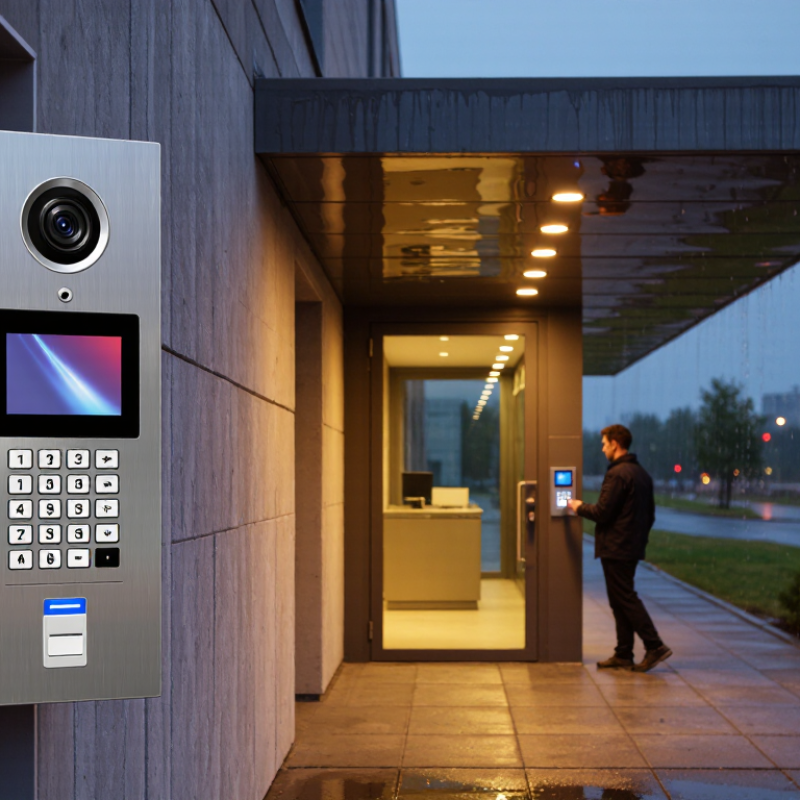
Start with the doorway, not the feature list. Note who needs access, when they arrive, and how often visitors need help. A family entrance may need simple individual codes, while a shared entry may need a directory and remote answering. Count deliveries and regular visitors for a week; memory tends to underestimate busy periods. Small detail, big difference.
Check what the camera must actually show. Measure the distance from the keypad to the visitor’s face, then consider backlighting, porch shadows, and rain. A camera aimed too high may capture the awning instead of a person. Stand outside at dusk and test the view from the indoor monitor or phone. It can feel awkward, but it reveals blind spots.
Decide whether you need live viewing, recorded clips, or both, and how long recordings should remain useful. A live image may be enough for occasional visitors; frequent deliveries may call for searchable clips and clear alerts. Check Wi-Fi strength at the entry, plus a practical power option if the connection drops. Also ask who can view footage and whether the camera captures neighbors or public walkways. One planning assumption often fails: everyone may not want to answer through an app, so keep the entry process clear for less tech-comfortable household members.

A door-entry camera should show more than a recognizable face in daylight.
Check resolution, field of view, low-light performance, and video delay. A wide view can capture the path, but may make faces look small. Test after dark. If possible, review sample footage on a phone, not just a product display. Grand View Research valued the global video intercom devices market at about USD 2.7 billion in 2023 and projected 12.2% annual growth through 2030. That market estimate signals growing interest, not proof that any particular camera performs well.
Keypads differ in daily use.
Physical buttons are easy to feel with wet fingers, while touchscreens can offer flexible layouts but may be harder to use in glare or cold weather. PIN entry is simple; temporary codes can suit guests or scheduled deliveries. Ask whether codes expire automatically, whether failed attempts are logged, and whether access can be limited by time. Small details matter. A keypad that works perfectly in a showroom may feel awkward beside a narrow, rain-soaked doorway.
Visitor controls deserve equal scrutiny.
Look for two-way audio, clear event history, and adjustable alerts, then check whether remote unlocking requires a deliberate confirmation. Consider who can create codes and view recordings. Too many notifications become noise; too few can hide a real visitor. I would not choose by screen resolution alone. Test the actual viewing angle and audio from the usual indoor location, because walls and street noise can change the experience.
Before choosing a video keypad door entry system, check connectivity at the actual entrance. A strong router signal indoors can fade beside a brick wall or metal gate. Test Wi-Fi where the keypad will be mounted, not from the kitchen. Don’t guess. If you plan to use Ethernet, confirm that a cable can reach the location and be routed safely. Also check whether the system needs a specific network frequency or a steady internet connection for alerts and remote viewing.
Confirm the required voltage and current before reusing an existing power supply. A keypad may work while the electric strike fails under load. That mismatch is easy to miss. Check whether the system uses Power over Ethernet, a low-voltage adapter, or both. If one supply powers the camera and lock, compare their combined demand with the supply rating. I still find power planning easy to underestimate, especially when an old transformer looks perfectly usable.
Existing wires do not prove compatibility. Check the wiring diagram and confirm that the new unit supports your current chime, intercom, or access-control setup. Look for relay requirements and the lock’s operating specifications. Take clear photos of the wiring before disconnecting anything; labels can be faint, and memory is unreliable. If the connections or voltage are unclear, have a qualified installer verify them before purchase.
A video keypad should be judged by what happens after someone presses a key, not just by its camera resolution. The FBI’s 2023 Crime in the Nation report estimated about 880,000 burglary offenses in the United States. That figure does not prove a camera prevents crime, but it makes reliable alerts and usable recordings worth checking. Look for individual access codes, event logs, and clear night images. A sharp picture can still be useless if faces blur under porch lighting.
Privacy deserves equal attention. NIST’s IoT cybersecurity guidance identifies data protection, controlled access, and software updates as core device capabilities. Check whether video is encrypted, who can view it, and how long recordings remain stored. IBM’s 2024 Cost of a Data Breach Report estimated an average global breach cost of $4.88 million; it covers organizations, not door systems, but highlights the stakes of weak data handling. Small details matter. Review account recovery and update support, too.
For outdoor units, check the actual weather rating and operating-temperature range. Under IEC 60529, IP65 indicates dust-tight protection and resistance to water jets; it does not mean the device can be submerged. Inspect the gasket, cable entry, and keypad buttons, where water can collect after a storm. A sheltered installation helps, but it is easy to overlook wind-driven rain or afternoon sun. Check the fine print.
Tip: Compare wired and wireless installation before judging the price. A wired keypad may need a cable run through a wall or gatepost, adding labor and disruption. Wireless models can simplify fitting, but check battery life, signal strength, and what happens during a router outage. Ask for an itemized quote covering setup, network configuration, and any extra hardware. A neat keypad is less useful if visitors cannot reach it reliably.
Tip: Calculate the full cost over several years. Check whether video storage, remote answering, or additional user codes require a recurring fee. Also ask about battery replacements, warranty limits, and the price of support after installation. Verizon’s 2024 Data Breach Investigations Report found that 68% of breaches involved a non-malicious human element. That figure is not specific to door entry systems, but it underlines why clear account setup and security guidance matter. Confirm how updates are delivered and who can help if access stops working.
Tip: Test the support process before buying. Ask how quickly technicians respond, whether help is available outside business hours, and if remote troubleshooting is included. Get the answers in writing. I would not choose on keypad features alone; I might still overlook a small recurring charge unless it appears clearly on the quote. A five-minute call can reveal more than a polished feature list.
| Tip | What to Compare | Installation Options | Ongoing Costs to Check | Support Questions |
|---|---|---|---|---|
| 1. Match the system to the entrance | Check camera field of view, night visibility, keypad usability, weather rating, and whether the unit supports one home or multiple residents. | Existing doorbell or intercom wiring may be reusable if it meets the system’s power and wiring requirements. New wiring may be needed for some installations. | Ask whether required features—such as video history, remote answering, or multiple user codes—need a paid plan. | Confirm that the system is suitable for the entrance’s exposure, lighting, and expected number of users. |
| 2. Choose a practical installation route | Compare the work involved, the need for electrical or access-control expertise, and whether installation affects the existing door, frame, or wiring. | Options include self-installation, hiring a qualified installer, or using a specialist for a larger multi-unit property. Complexity depends on existing wiring and door hardware. | Budget for possible labor, wiring, mounting materials, and any compatible power supply or network equipment. | Ask who handles setup, testing, and troubleshooting, and whether installation work is covered by a workmanship warranty. |
| 3. Check power and backup needs | Verify the required voltage and power method, and find out what happens to entry functions during an outage. | A system may use existing low-voltage wiring, a dedicated power supply, or another manufacturer-specified method. Do not assume a doorbell transformer is compatible. | Always-on devices use electricity; actual consumption depends on the model and configuration. A backup battery or power supply may add replacement costs. | Ask whether the keypad and door release continue to operate during an internet or power outage, and what backup is recommended. |
| 4. Compare local and cloud video storage | Review recording length, event limits, video quality, retention period, privacy settings, and how footage can be exported. | Local storage may require a memory card or recorder and a suitable installation location. Cloud storage depends on an internet connection and the service’s availability. | Local storage can avoid a recurring video-storage fee but may require replacement media. Cloud recording commonly involves a subscription; check its price and renewal terms. | Ask how long footage is retained, whether it remains accessible after cancellation, and what support is available if recordings cannot be retrieved. |
| 5. Calculate the full recurring cost | List every service or consumable required for the features you plan to use, not just the upfront equipment price. | Installation choice does not usually remove service charges, but it can affect equipment, wiring, and maintenance needs. | Check for cloud plans, optional app features, cellular connectivity, replacement batteries or storage media, and any required service visits. Confirm whether fees are per device, home, or user. | Request a written list of recurring and optional charges, including price changes, renewal dates, and cancellation conditions. |
| 6. Verify network and privacy requirements | Check Wi-Fi or wired-network requirements, app compatibility, account security options, and the handling of video and visitor data. | Weak wireless coverage at the entrance may require improved network coverage or a wired connection, depending on the system. | Network equipment or internet-service upgrades may add costs. Video uploads can also use data, especially when recording frequently. | Ask how software updates are delivered, how access is restored if an account is locked, and how to delete users and recordings. |
| 7. Evaluate warranty and long-term support | Compare hardware warranty length, exclusions, replacement procedures, software update policy, and expected product availability. | Confirm whether future repairs require the original installer or can be handled by another qualified technician. | Allow for out-of-warranty repairs, replacement parts, and any paid support or maintenance plan. Costs depend on the system and local service rates. | Check support hours, response channels, replacement timelines, and whether help is available for both the device and its app or cloud service. |
| Planning note: Requirements and costs vary by property, wiring, location, service plan, and installer. Confirm compatibility and obtain itemized quotes before purchasing. | ||||
Please fill out this form and we will get an order or estimate ready for you. Please give us as much detail as you can for us to get started, and we will contact you to finsh the work order.